

 Continue with Google
 Filters
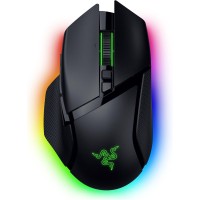
Razer Basilisk V3 Pro 35K Wireless Gaming Mouse White RGB 35K DPI


Razer Basilisk V3 Pro 35K Wireless Gaming Mouse White RGB 35K DPI
-
Price:FL 425.00
As low as FL 51.89/month with
 Learn more
- Only 2 left in stock - order soon.
Description:
The Razer Basilisk V3 Pro 35K is a premium wireless gaming mouse engineered for competitive gamers and enthusiasts who demand precision, customization, and performance. Powered by the Razer Focus Pro 35K Optical Sensor Gen‑2, this mouse delivers exceptional tracking accuracy and responsiveness across a wide range of surfaces, including glass.
Featuring Razer HyperSpeed Wireless connectivity, customizable RGB lighting, and 13 programmable controls, the Basilisk V3 Pro 35K is designed to adapt to different gaming styles and productivity needs. Its configurable HyperScroll Tilt Wheel offers tactile and free‑spin scrolling modes, while Gen‑3 Optical Mouse Switches provide fast actuation and long‑lasting durability. Battery life can reach up to 140 hours for extended gaming sessions.
Key Features / Specifications:
- Razer Focus Pro 35K Optical Sensor Gen‑2
- Up to 35,000 DPI sensitivity
- Razer HyperSpeed Wireless and Bluetooth connectivity
- Configurable HyperScroll Tilt Wheel
- 13 programmable buttons and controls
- Razer Optical Mouse Switches Gen‑3
- Up to 140 hours of battery life
- 13‑zone Razer Chroma RGB lighting with full underglow
- Ergonomic right‑handed design
- Compatible with Razer Synapse software
- White color finish
What’s in the Box:
- Razer Basilisk V3 Pro 35K Wireless Gaming Mouse
- USB Wireless Receiver
- USB Charging Cable
- User Documentation